Voltas Ac Remote Function
Posted on October 4th, 2022Table Of Contents
In this Article i will explain Voltas Ac Remote Function, Setting manual in this detailed guide. Do you own Tata Voltas Air Conditioner and have trouble understanding how to use Voltas Ac Remote? this guide is for you.
Note : There are many variants of Voltas Ac Remote are available in the market, we will stick to common Voltas Ac Remote Function in this guide.
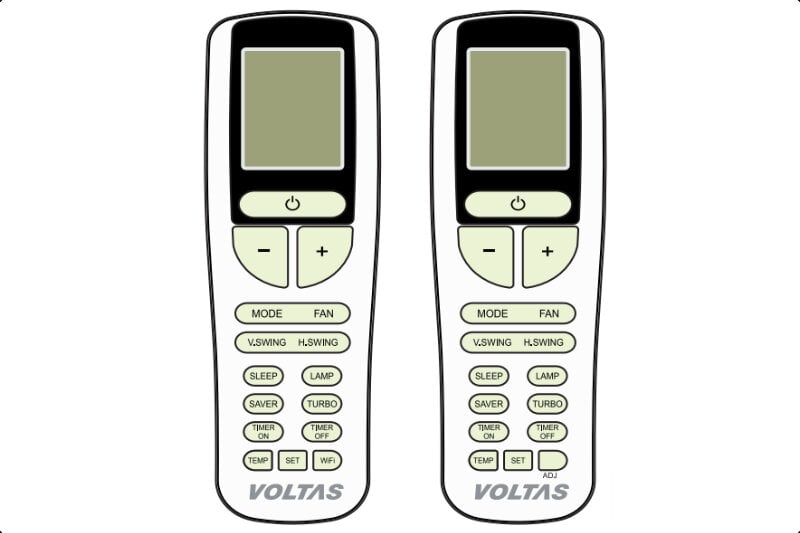
Here is a list of Voltas Ac Remote Function :
Power Button :
Use power button to turn On or Turn off Voltas Air Conditioner. Power button is represented by  this symbol or l/O or ON/OFF. Voltas Air Conditioner will always start with previous settings.
Temperature Buttons :
Use + and – Temperature buttons to set Temperature on Voltas Air Conditioner.
- In some remotes there will be Up (⌃) and Down (⌄) buttons
- Clock Time for Timer ON and Timer OFF can be set using these buttons.
Voltas Ac Remote Modes :
Voltas Ac Remote Setting for Mode is very important to get performance and desired results with your Voltas Air Conditioner. There are 4 operation modes available in Voltas Ac which are Fan, Cool, Dry and Heat.
- To activate or toggle between modes, press mode button several times until you see your desired mode symbol on Voltas Ac remote screen.
- There is Fan motor protection and Sensor Fail Protection in Voltas Air Conditioner.
Voltas Ac Fan Mode :
In this mode your Voltas Ac will work as a Fan without heating or cooling and compressor will be off.
- To activate, press mode button several times
- until you see “fan” symbol.
Voltas Ac Cool Mode :
Use it to cool the room in Summer and set desired temperature using + and – buttons.
- Snowflake symbol will appear on Voltas Ac remote Screen.
- Temperature range is 16 degree Celsius to 30 degree Celsius.
- Indoor fan will run at selected fan speed
- Compressor will adjust fan speed as per desired temperature.
- To activate, press mode button several times until you see snowflake symbol.
- There is Defrost protection in Cool Mode.
Voltas Ac Dry Mode :
Use it during rainy season when humidity is high, in this mode Voltas Ac will remove moisture from the room without cooling or heating. ( rain drop symbol will appear ).
- Fan speed will be low and set temperature will be 24 degree Celsius which can not be changed.
- Compressor cycling will be same as in cool mode.
- To activate press mode button several times until you see rain drop symbol.
Voltas Ac Super Dry Mode :
Super dry mode removes humidity levels quickly as compared to Dry mode. When you select Dry mode it will initially start with Super Dry mode.
- Voltas Air Conditioner Indoor unit will display “Sd”.
- Fast Auto Swing louver can not be changed.
- Set Temp and Fan Speed can not be changed.
Voltas Ac Heat Mode :
Use heat mode for heating the room during winters ( not available in all models ).
- Sun symbol will appear on Voltas Ac remote Screen.
- Temperature range is 16 degree Celsius to 30 degree Celsius.
- Indoor fan will run at selected fan speed
- Compressor will adjust fan speed as per desired temperature.
- To activate, press mode button several times until you see Sun symbol.
- There is Defrost protection in heat mode.
Voltas Ac Fan Speed :
Press Fan button multiple times to change fan Speed between Low, Medium, High, and Auto. The Auto fan works only in Cool mode and in this function Voltas Ac will automatically set fan speed.
Voltas Ac Vertical Swing :
Press V.SWING button to change location of vertical fan angle ( louver ) which will change fan air direction between very bottom ( floor ) to up high ( ceiling ). Press V.SWING button multiple times to get your desired fan angle.
Voltas Ac Horizontal Swing :
Use Horizontal Swing to change horizontal louver location ( fan angle ). Fan air will change direction between right and left. Press H.SWING button multiple times until you get your desired fan location.
This option is not available in all models.
Voltas Ac Turbo Function :
Use Turbo function to get maximum performance and to quickly cool the room ( or quickly heat the room in heat mode ). Press Turbo button to activate this Voltas Ac Remote Function. If you press mode or fan button this function will turn off.
Voltas Ac Lamp :
Use this LAMP button on Voltas Ac remote to turn off or turn on the display light of indoor unit.
- When Lamp function is enabled, display will go off except function indicator.
- When lamp is enabled, if user press Temperature keys then display will turn On for 5 seconds.
Voltas Ac Timer ON / OFF :
This Voltas Ac Remote Function can be used to automatically turn On or Turn Off the Air Conditioner. Use Timer ON to automatically turn ON Voltas Air Conditioner after a set time. Similarly, use Timer OFF to automatically turn OFF Voltas Ac.
- To Activate Timer ON, press Timer ON button and Use Temperature + and – or Up (⌃) and Down (⌄) buttons to set time. After adjusting Clock time, press SET button to confirm Timer ON.
- To Cancel Timer ON press Timer ON button again.
- To Activate Timer OFF, press Timer OFF button and Use Temperature + and – or Up (⌃) and Down (⌄) buttons to set time. After adjusting Clock time, press SET button to confirm Timer OFF.
- To Cancel Timer OFF press Timer OFF button again.
Voltas Ac SLEEP Function :
This function is useful for Comfortable Sleep and energy saving. You can Set lower temperature in Cooling mode and activate Sleep function. In Sleep mode, set temperature will increase by 1 degree Celsius in first hour and another 1 degree Celsius in second hour. Total 2 degree temperature will rise.
- To activate press SLEEP button
- This function is only available in Cooling Mode.
Voltas Ac Saver Function :
Use this feature of Voltas Air Conditioner to save energy. When this function is active, Temperature will be set at 24 degree Celsius and fan speed will be at medium.
- To activate press SAVER button
- Only available in Cooling mode.
- You will not be able to Set temperature lower than 24 degree.
Voltas Ac TEMP/FEELING function :
When you press this button room temperature will display on the indoor unit for 5 seconds.
Voltas Ac Flexi Cooling :
To get optimum cooling with low power consumption for energy saving use Flexi Cooling.
- To activate or deactivate Flexi Cooling Function press ADJ button on the Voltas Ac remote.
- “Ad” will display on the indoor unit.
- In cooling mode, either flexi cooling or Saver function will work ( can not use both of them together ).
- This feature is available only in selected models.
Voltas Ac Remote Child Lock :
To protect the Voltas Ac remote from accidental change of setting from children or elderly there is a smart child lock function. When activated lock icon will blink on remote screen if anyone tries to press any key.
To activate or deactivate, press and hold + and – Temperature buttons together.
How to Unlock Voltas Ac Remote :
To unlock Voltas Ac remote press and hold + and – Temperature buttons together. In some remotes there will be Up (⌃) and Down (⌄) buttons. Read More ..
How to Reset Voltas Ac Remote :
To Reset Voltas Ac Remote the easiest method is to remove the batteries, wait few seconds till remote display turns off and then you can put the batteries back on to use it.
Jump to Add New Comment ↓